
An official product guide
MoDeck Review 2026: Features, Limitations, Pricing and Best Fit
MoDeck lets your team turn After Effects templates into new videos from a browser. A designer decides what can change, editors supply the content, and your own connected computer renders the result.
Published by the team behind MoDeck. We sell the product, so this is an official guide to its strengths, requirements, and limitations, rather than an independent review.
Who MoDeck is for
MoDeck is a strong fit when you already like your motion design and need to reuse it. Think product offers, regional campaigns, programme promos, event announcements, or language versions: the animation stays familiar while the content changes.
The useful shift is who handles those changes. A producer or marketer can replace a headline, choose footage, and request a finished video without opening After Effects. Your motion designer builds the rules once, then spends less time making the same kinds of revisions.
Cost is another reason to consider it. Enterprise includes unlimited local rendering for US$79 a month, with no MoDeck fee per video or rendered minute. If you already have the Adobe setup and hardware, that can make a substantial difference to the cost of producing frequent versions.
You’ll get the most from it if someone on your team can prepare After Effects templates and look after a render computer. If your priority is having a provider manage every part of rendering, a managed cloud service is likely to suit you better.
Details: How the owner and editor workflows fit together · Current plans and limits
How MoDeck works
The starting point is an After Effects Motion Graphics Template, or MOGRT: a reusable scene with controls for the content you want to change. A MoDeck template can contain several of these scenes.
- Design in After Effects
Add editable properties to Essential Graphics, such as text, colors, sliders, and replacement media, then export your MOGRTs.
- Prepare the template in MoDeck
Put the MOGRTs in a named folder inside MoDeck Sync. The desktop app reads them and makes their controls available online. Choose the template’s logic, editor experience, access, and output settings.
- Create versions in the browser
An invited editor opens the template, changes the permitted values, previews the result, and requests a render. They don’t need After Effects or the source project on their computer.
- Render on your connected machine
MoDeck assembles the edit in After Effects. The desktop app handles rendering and delivery, using Media Encoder where the output settings require it.
For example, a designer could build a retail promotion with a headline, product image, price, and end card. A regional marketer could make the next offer by changing those inputs. The designer would still need to prepare the layout to handle the expected text lengths and image shapes.
Details: Preparing MOGRTs · Rendering and delivery
Why render After Effects templates locally?
Rendering on a computer you control can be a practical advantage when your After Effects environment is already part of your production workflow. Here’s what that control gives you.
Keep your Adobe setup close to the work
Your render machine runs After Effects with the fonts, plug-ins, assets, and presets you’ve installed. You choose when to update that environment and can investigate a problem on the machine doing the work. This is useful when a design depends on a particular effect or an established export preset.
Compatibility still needs checking. A plug-in must be installed and licensed appropriately, and the template must work through MoDeck’s automated MOGRT workflow. A successful manual render in After Effects is a useful starting point, not proof that every unattended render will work.
Keep source projects and template assets on your machines
Your source MOGRTs, After Effects projects, and locally referenced template assets stay on your render machines. Browser editors can create versions without receiving those source files.
MoDeck stores the template information, edit settings, and media needed for the online editor. You choose whether finished videos are also uploaded for online viewing and download.
Details: Desktop sync and file handling · Output upload settings
Unlimited rendering at a fixed subscription price
MoDeck Enterprise includes unlimited local rendering for US$79 per month, or US$790 billed yearly, excluding tax. There’s no monthly allowance of rendered videos or minutes to buy again when you need more output. An extra language, another offer, or a corrected version doesn’t add a MoDeck rendering charge.
For a team with suitable hardware and Adobe licenses already in place, this can substantially reduce the service cost of repeat production compared with paying for metered cloud rendering. Your subscription stays the same as output grows. Your computers’ capacity, the connected-machine limit, and technical batch limits still determine how much work you can run and how quickly.
Include hardware, Adobe, plug-ins, storage, electricity, and maintenance when comparing total costs. A provider that manages rendering for you is also taking on work your team would otherwise handle. The saving is most compelling when you can put an existing production setup to work.
Details: MoDeck plans and usage limits
Deliver into your existing production workflow
You can save finished media to a chosen local folder, with filenames and subfolders based on the edit’s data. That can feed an existing watch-folder workflow. Enable output uploads when editors also need browser downloads or delivery emails.
MoDeck can also save the assembled edit as an After Effects project for further work. That gives a designer a route back into the composition when a particular version needs a manual finish. Moving that project to another computer still requires its assets, plug-ins, and the corresponding prepared fonts.
Details: Output formats, folders, and project requirements · Local delivery and AEP assets
What your team can edit in the browser
The template owner decides which controls editors see. Text, images, video, colors, numbers, and dropdown choices can become everyday inputs, while the underlying animation stays in the template. Clear labels, required values, character limits, and help text can make the handoff easier.
A timeline or a guided set of choices
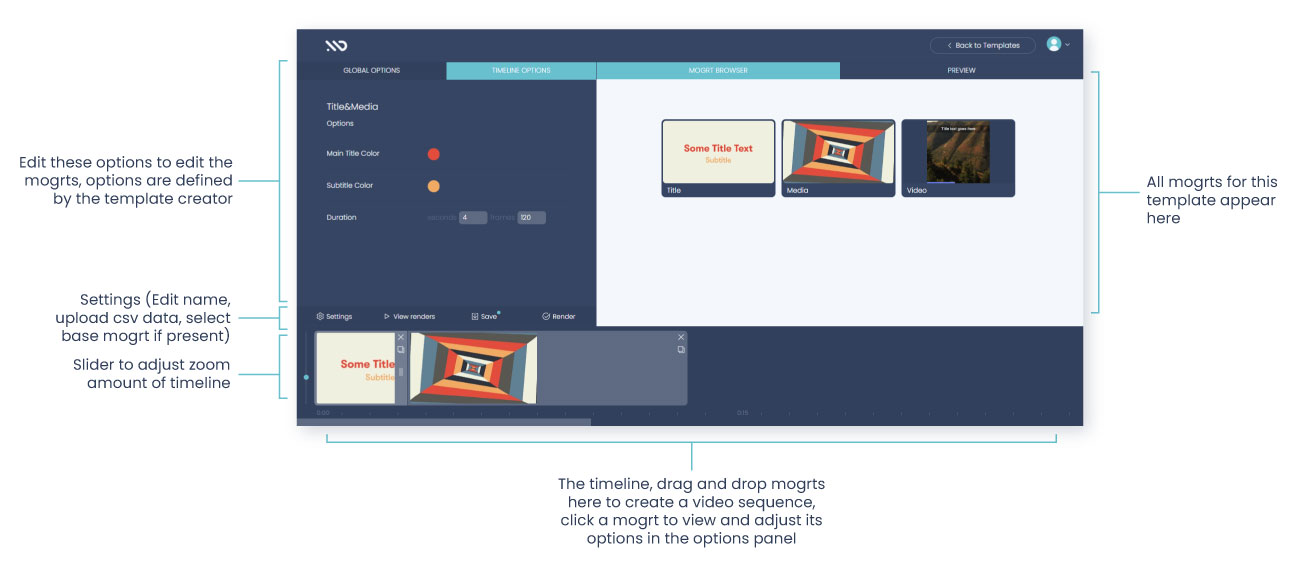
The Sequence editor lets people work with scenes on a timeline and connect data sources. The Journey editor presents options one step at a time, which suits a simpler, form-like task. Neither requires the editor to learn the After Effects interface.
Scene structure is a separate choice. You can let editors add, repeat, and reorder scenes, or define the sequence yourself when the order needs to stay fixed. Fresh previews are generated through After Effects on a connected render machine, so preview responsiveness depends on that machine and the template.
Details: Sequence and Journey editors · Predefined sequences · How previews work
One choice can control several scenes
Global options let one input drive several MOGRT controls. For example, a brand-style dropdown could change colors across an intro, a product scene, and an end card. Conditions can include or remove scenes, and expressions can derive values from other inputs.
Template authors can also expose duration, stretch, start time, overlap, and supported output dimensions. More specialized processing can use JSX scripts after MoDeck assembles the After Effects project. These are tools for the person building the template; editors only need to understand the choices you give them.
Details: Global options, expressions, and conditions · Timing and dimension controls · Post-assembly scripting
Share an editing experience with colleagues or clients
You can invite people to individual templates. Enterprise adds reusable editor groups and Magic Links for editing without an account, with password and render-request approval controls. It also supports your own editor logo and colors, embedding on your website, and custom notification emails.
For an agency, that could mean a client fills in approved content through a branded editor while the agency owns the design and rendering setup. Access settings and a well-designed template remain part of the job.
Details: Invitations, Magic Links, and approvals · Branding and embedding
Data-driven video, scheduling, and integrations
When the same inputs change across many videos, connecting data is usually more useful than filling out a form repeatedly. MoDeck supports CSV, a built-in spreadsheet, Google Sheets, and HTTPS JSON sources.
Turn rows into video versions
Link columns to text, media, or global options. Each included row becomes a version, with the output sizes and formats you’ve selected. Matching option and column names can establish the initial links automatically, and you can change those mappings yourself.
For example, a campaign sheet could hold each location’s name, offer, image URL, and end date. Render conditions can skip rows that aren’t ready, and dynamic filenames can identify the location in the output folder. JSON can supply values from another system; generating multiple videos from a JSON array requires Enterprise.
Details: Data sources, mappings, and render conditions · Data features by plan
Run on a schedule or connect another system
Data-driven edits can run on a schedule. Keep the intended desktop app online at the scheduled time. Google Sheets and JSON data are fetched for a new render run, so a recurring workflow can use updated source values; batch retries reuse the captured data.
The public API covers template inspection, previews, render requests, status and output retrieval, media, editor access, and template logic. Render webhooks can notify another service about status changes. Use the endpoint reference to check your workflow: API access doesn’t imply that every desktop or browser setting has an equivalent endpoint.
MoDeck also has a Zapier integration with a “Render a Video” action and a “Render Complete” trigger. That offers a way to connect other apps without writing the entire integration yourself. Zapier’s own plan and task limits apply, and rendering still needs your connected machine.
Details: Scheduling and data refresh · Public API reference · Render webhooks · MoDeck’s supported Zapier actions and triggers
Add machines for separate jobs
You can sign in on multiple render computers to handle separate jobs. MoDeck assigns work to an available machine based on its current job load. You’re responsible for keeping each machine’s templates, assets, fonts, plug-ins, and presets ready.
A single batch stays on its assigned machine and renders its rows and sizes in sequence. Adding another computer doesn’t divide that batch between them. Plan capacity around your actual projects, deadlines, and number of independent jobs, rather than assuming a large spreadsheet will render quickly.
Details: Multiple render machines and synchronization · Batch rendering behavior
Requirements, limitations, and when to choose something else
MoDeck moves repeat editing out of After Effects, but someone still needs to own the template and the rendering setup. These are the responsibilities to allow for before you adopt it.
Templates take preparation
An existing After Effects project needs suitable Essential Graphics controls and a MOGRT export. Layouts must handle the content people will enter: long headlines, different image proportions, missing values, and the languages you intend to use. MoDeck applies the controls and logic you’ve built; it doesn’t automatically redesign a composition around any input.
For a one-off video with frequent creative changes, preparing a reusable template may take more effort than finishing the edit directly in After Effects.
Details: Template preparation requirements
Availability and render speed are yours to manage
Fresh previews and final renders require a connected computer with MoDeck, After Effects, and the necessary local files. Some output workflows also need Media Encoder. Keep enough memory and disk space available, and account for sleep settings, software updates, internet access, and other work running on that computer.
Stored edits and previous uploaded outputs can remain accessible while the render machine is offline. New previews can’t be generated then. A render request may queue before it starts, but an ordinary render interrupted by a worker disconnect can fail. Don’t treat a queued request as completed work.
Details: Desktop setup · Availability and render failures
Recovery has boundaries
Data-driven batches keep progress so you can pause after current work, retry failed videos, or resume on the same machine after a restart. Keep the local job files intact. Verified completed outputs can be reused; an interrupted output may need to render again.
Recovery doesn’t automatically move the batch to a second computer. Retries use captured source data but can use updated local MOGRTs, so avoid changing templates midway through a batch if all versions need to match.
Details: Batch recovery and retry rules
A completed render still needs a visual check
Check typography as well as visual elements. Each additional render machine needs the correct fonts.
When another approach makes more sense
- Design freely in a browser without an After Effects author
- Choose a browser-native video editor with the design tools and assets your team needs.
- Avoid maintaining render computers, or absorb large bursts of simultaneous jobs
- Evaluate a managed cloud renderer. Check its supported effects, concurrency, delivery times, and total cost against a representative project.
- Keep the entire workflow offline or inside your own infrastructure
- Look for a fully local or self-hosted system. MoDeck’s browser editing and coordination use online services.
MoDeck pricing and plan limits
As of 8 October 2026, Pro costs US$19 per month or US$190 billed yearly. Enterprise costs US$79 per month or US$790 billed yearly. Prices exclude tax. There’s a 15-day free trial with no card required.
Choose a plan around the workflow you need, as well as its price:
- The trial supports 2 templates, 1 invited editor per template, 3 MOGRTs per template, 3 spreadsheet rows per batch, and 1 connected desktop app. It’s enough to check the core design-to-output workflow.
- Pro supports 5 templates, 3 invited editors per template, 8 MOGRTs per template, 30 CSV or Google Sheets rows per batch, and 4 connected desktop apps. Template logic and scheduled rendering are included.
- Enterprise adds account-free Magic Links, editor groups, branding and embedding, multi-video JSON arrays, and 8 connected desktop apps. It removes the subscription caps on templates, invited editors, MOGRTs, and spreadsheet batch size, while technical limits still apply.
Enterprise spreadsheet batches currently accept up to 100,000 source rows, subject to file and data-size limits. That is an input ceiling, not a render-speed promise. Enterprise API usage remains subject to request rate limits. Your Adobe software, hardware, plug-ins, and third-party services are separate costs.
Details: Current prices and full plan comparison · Technical batch limits
Is MoDeck worth it? Test one real workflow
The strongest reason to choose MoDeck is that it lets more people use your existing motion design while your team keeps control of the After Effects environment. It’s worth evaluating when repeat requests consume a designer’s time and you’re comfortable owning the render setup.
Use the trial to follow one recurring job all the way through. A small, representative test will tell you more than a template filled with easy sample text.
- Choose a job you actually repeat
Use a real campaign or programme format, including its usual effects, media, fonts, and export settings.
- Give it to the intended editor
Ask a colleague who doesn’t use After Effects to create a version. Notice which labels, choices, and instructions need improving.
- Try awkward inputs
Use a long headline, a different image shape, and representative language characters. For data workflows, start with three deliberately varied rows within the trial limit.
- Check delivery and capacity
Inspect the finished files and typography, confirm filenames and delivery locations, and measure preview and render time on the machine you intend to use. Allow for the number of requests you expect at busy times.
If the editor can get the right result without repeated designer intervention, and your machine can deliver it within your deadline, you have a useful foundation for repeat production. If managing that machine is the obstacle, include a managed rendering service in your evaluation.
Details: Start with the setup guide
Frequently asked questions
Can MoDeck export both video and still images?
Yes. Output choices include MP4, MOV, JPG, PNG, GIF, and custom Adobe Media Encoder EPR presets. The template owner enables the available formats. For stills, render markers in the MOGRT can identify the frames to output.
Can one template produce landscape, square, and vertical videos?
Yes, when the template is authored for those dimensions. Each visible scene and any base scene must support a matching output size, and the artwork must respond correctly to it. MoDeck can render the configured sizes; the designer still needs to make the layout work at each one.
Details: Configuring output dimensions
